



When search engines find multiple URLs leading to identical or highly similar content, canonical issues occur. This confusion can split ranking signals, waste crawl budget, and cause the wrong page to show up in search results.
In simple words, multiple URLs with similar content (no canonical direction) can kill your SEO quietly. So, how to solve canonical issue in SEO? Let’s check it out.
Did You Know?
According to recent reports, 29% of websites face duplicate content issues without even knowing it.
What is a Canonical Tag?
The canonical tag is a line of HTML code that tells the search engines what the master copy of a page URL is. It prevents duplicate content issues by consolidating all ranking signals into a single page.
Types of Canonical Issues
Even with good content, small technical mistakes can create silent canonical issues. Here are the most common ways your site might be generating duplicate pages:
- Parameter Trap: Marketing campaigns insert tracking tags such as ?utm_source into your links. Humans will see the same page, but search engines will see a different URL.
- Slash Confusion:domain.com/page and domain.com/page/ mean the same thing to us. But that simple trailing slash causes search bots to crawl two different pages.
- Protocol Split: If your site does not use HTTPS over HTTP or WWW over non-WWW, you are serving duplicate content on different variations of your domain.
- Sorting/Filtering: E-commerce filters generate so many URL variations for the same product list.
How To Audit And Find Canonical Issues?
Here’s how to perform a basic technical SEO audit to find canonical issues within your website:
1. Check Google Search Console (The Direct Source)
The quickest way to find a non-canonical URL is to use Google’s own data:
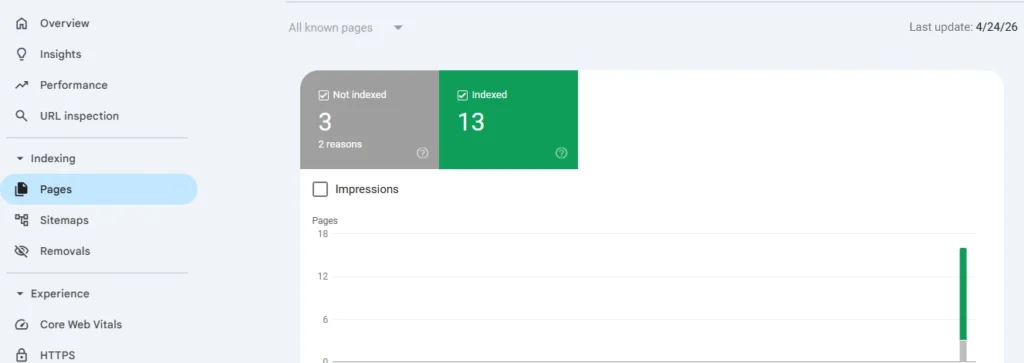
- Open Google Search Console and head to Pages under the Indexing section.
- Look for the “Why pages aren’t indexed” table.
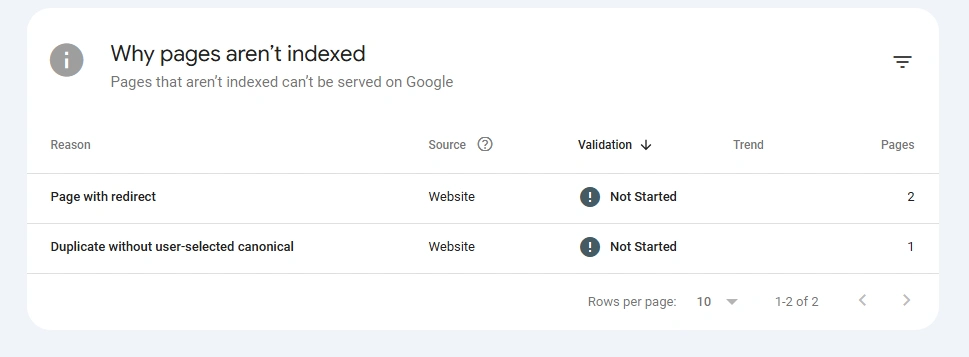
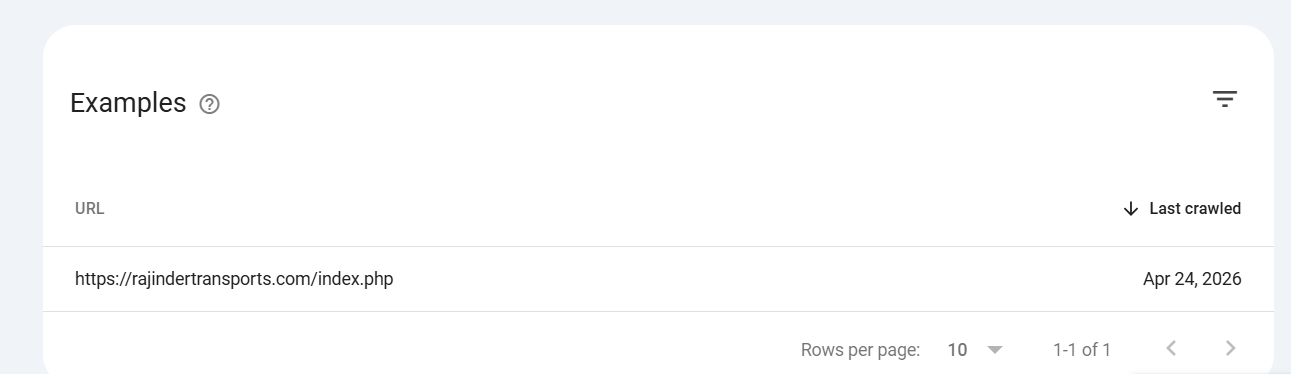
- Watch out for two particular statuses: “Duplicate without user-selected canonical” and “Alternative page with proper canonical tag.” If you find these errors, just click on them to see the exact URLs that Google is flagging.
2. Perform a Technical Site Crawl
You can also use a crawler like Screaming Frog or Sitebulb to find hidden canonical issues at scale.
Crawl your whole domain and view the report. Filter out critical errors such as missing canonical tags, multiple tags on a page, or canonicals pointing to broken (404) or redirected (301) links.
3. Manually Review Your Source Code
Want to check your important landing pages quickly?
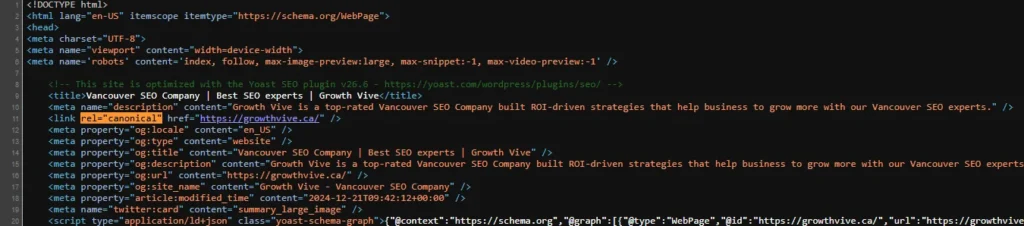
- Right-click on the webpage you wish to audit and select View Page Source

- Simply search for rel=”canonical” (CTRL+F or CMD+F).
- Make sure that the URL displayed is an exact match to the page you want ranking.
Did You Know?
The rel=”canonical” tag was officially introduced in February 2009 as a joint collaboration between Google, Yahoo, and Microsoft (Bing) specifically to help webmasters fix the internet’s massive duplicate content problem.
Feeling it’s too hard to do it on your own? At Growth Vive, we can conduct an in-depth technical SEO audit for your website and figure out exactly what issues are affecting your website’s performance.
Tips On How To Solve Canonical Issue in SEO
You have run the audit and identified the duplicate pages dragging down your crawl budget. Now, let’s get into exactly how to solve canonical issue in SEO:
1. Break Canonical Chains Before They Break Your Rankings
This is what a canonical chain looks like:
Page A → Page B → Page C
Search engines follow the trail. But each hop cuts the signal. Or worse, if the chain is circular (A → B → A), Googlebot gets more confused.
Here’s how to avoid that:
- Use the Canonical Chains report in Screaming Frog. It graphically displays all hops.
- The rule is quite simple: the page you really want to rank should be the last target of all near-duplicates.
2. Fix Pagination Without Breaking The Content
Pagination is the process of dividing large content sets into smaller pages through numbering. It’s one of the largest sources of canonical issues.
If each paginated page is self-canonicalized, search engines will see Page 2, Page 3, and Page 4 as separate and competing entities, diluting the authority of the main category page.
Pick one clear strategy and stick to it:
- Is the View-All page there and fast? Canonicalize all paginated pages to the View All URL. This consolidates all signals into one big hitter.
- No View All page? Keep self-referencing canonicals on each paginated page, but add rel=”next” and rel=”prev” link tags. This tells Google that the pages are a logical sequence, without pretending that Page 2 is the same content as Page 1.
3. Don’t Let Your Staging Site Rank Higher Than Your Live Site
I’ve seen this way too many times. The developer pushes the code of the live site, and the canonicals are still pointing to staging.yoursite.com.
Google crawls the staging URL, finds it indexable, and your test environment suddenly appears in the SERPs alongside your real domain. And guess what? Both users and bots get confused.
You can prevent these canonical issues through these steps:
- Check the canonical tag on the homepage and the 5 most important inner pages after every site launch or migration
- Protect staging and development environments with a password
4. Use 301 Redirects for Permanent Duplicates
If the duplicate variation doesn’t provide anything unique for the user, kill the duplicate. And a 301 redirect is the best way to do so. It permanently passes all traffic and link equity from the bad URL to the clean URL.
Please do this in your server configuration or DNS settings. You should never use lightweight WordPress plugins if you can handle it at the server level.
Frequently Asked Questions (FAQs)
1. What is a canonical issue?
Canonical issues occur when search engines encounter multiple URLs with identical content. The search engine isn’t sure which version is the original version, so it spreads your link equity across a number of duplicate pages.
2. How to solve canonical issue in SEO?
The best way to fix these is to add a self-referencing rel=”canonical” tag to your main pages and implement server-level 301 redirects for permanent duplicates (e.g., HTTP vs HTTPS).
3. Is a canonical tag a redirect?
No, a canonical tag is just a strong hint to search bots as to which page to index, whereas a 301 redirect physically takes a user to a new destination.
4. Why are canonical tags so important for Generative Engine Optimization (GEO)?
Modern AI search overviews need a single source of truth to cite your content with confidence. Canonical issues confuse them.
5. Can I use multiple canonical tags on one page?
No, never. If your website code accidentally spews out multiple, conflicting canonical tags in <head> , search engines will completely ignore all of them.
Conclusion
Even though canonical issues won’t break your website in a single day, they silently weaken it every day. And fixing them is not a herculean task anymore.
At Growth Vive, we specialize in fixing technical issues like these to make sure that your website gets the deserved ranking. Get in touch with us now for more information!